6.7 KiB
Basics 101
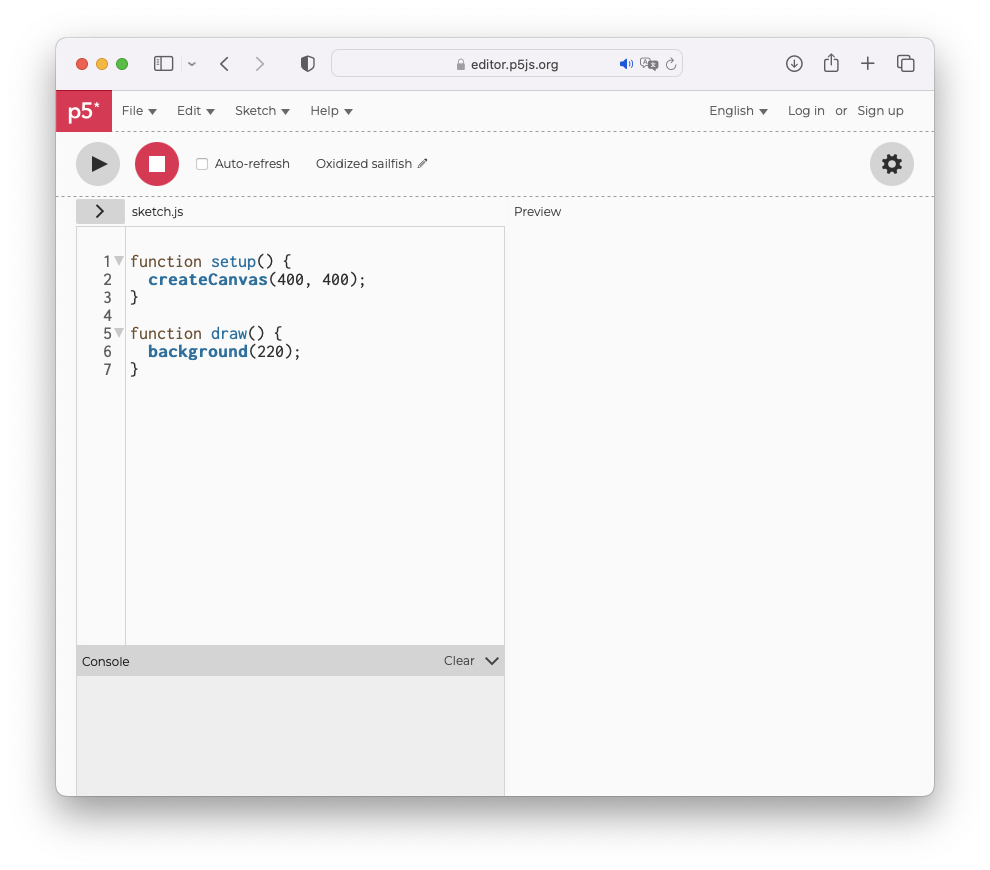
👋 p5js Editor
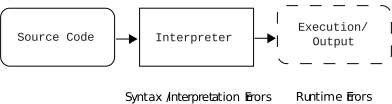
🤔 How does code work/act?

Sketch: 0. Hello World
// Hello world!
// This is a comment

function setup() {
  createCanvas(800, 800);
}

function draw() {
  background("yellow");
  print("Hello World");          // see the console below ↓
}
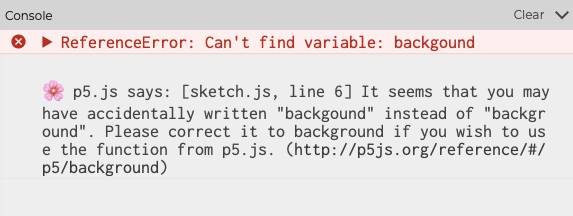
🤔 What kind of "Errors"?
Sketch: 1.0 Key Events
// Key Events!

function setup() {
  createCanvas(800, 800);
}

function draw() {
  background("yellow");
  // Only when keyIsPressed?
  print("Hello World");
}

// Reference: https://p5js.org/reference/
📚 Exercise
- Modify the sketch 1.0 so that "Hello World" is printed only when a key is pressed. To do so have a look at the p5js reference
Sketch: 1.1 Mouse Events
// Mouse Events!

function setup() {
  createCanvas(800, 800);
}

function draw() {
  background("yellow");
  if(mouseIsPressed) {
    print("Pressed: " + mouseX + " - " + mouseY) ;          // see the console below ↓
  }
}

// this is a special p5 function
function mouseMoved() {
  print("Moved: " + mouseX + " - " + mouseY) ;              // see the console below ↓
}

// Reference: https://p5js.org/reference/
📚 Exercises
-
Modify sketch 1.1 so that a circle is drawn on the canvas at the location where the mouse is located each time it moves. To do so have a look at [p5js reference](Reference: https://p5js.org/reference/).
-
What can you observe with the circle being drawn on the canvas? Can you modify the sketch so that a trace of the movement of the mouse stay on the canvas and erase itself when the mouse is pressed?
🤔 What are (x,y) coordinates (in p5js)?

Sketch: 1.2 Variables
// Variables!

var previous_mouseX_pressed = 0;  // global "var" variable
var previous_mouseY_pressed = 0;  // global "var" variable

function setup() {
  createCanvas(800, 800);
}

function draw() {
  // background("yellow");
  if(mouseIsPressed) {
    let current_mouseX_pressed = mouseX;  // local "let" variable valid within "{" brackets "}"
    let current_mouseY_pressed = mouseY;  // local "let" variable valid within "{" brackets "}"

    print("Pressed: " + current_mouseX_pressed + " - " + current_mouseY_pressed) ;

    previous_mouseX_pressed = current_mouseX_pressed;
    previous_mouseY_pressed = current_mouseY_pressed;
  }
}

// this is a special p5 function
function mouseMoved() {
  print("Moved: " + mouseX + " - " + mouseY) ;              // see the console below ↓
}

// Reference: https://p5js.org/reference/
📚 Exercises
-
Modify sketch 1.2 so that a line is drawn between the location of the current mouse press and the previous location. To do so have a look at [p5js reference](Reference: https://p5js.org/reference/).
-
Modify the sketch further and try erasing what is drawn on the canvas each time a key is pressed.
Sketch: 1.3 Distance and Text
// Distance and Text!

var previous_mouseX_pressed = 0;
var previous_mouseY_pressed = 0;
var distance_previous_current = 0;

function setup() {
  createCanvas(800, 800);
}

function draw() {
  background("yellow");

  distance_previous_current = dist(previous_mouseX_pressed, previous_mouseY_pressed, mouseX, mouseY);    // calculate distance

  circle(previous_mouseX_pressed, previous_mouseY_pressed, 5);              // draw circle at the previous location
  line(previous_mouseX_pressed, previous_mouseY_pressed, mouseX, mouseY);   // draw line between previous and current
  circle(mouseX, mouseY, 5);                                                // draw circle at the current location

  text(distance_previous_current, mouseX, mouseY);                          // write distance as text at the current location

  if(mouseIsPressed) {
    let current_mouseX_pressed = mouseX;
    let current_mouseY_pressed = mouseY;

    print("Pressed: " + current_mouseX_pressed + " - " + current_mouseY_pressed) ;

    previous_mouseX_pressed = current_mouseX_pressed;
    previous_mouseY_pressed = current_mouseY_pressed;
  }
}

// Reference: https://p5js.org/reference/
📚 Exercise
- Modify sketch 1.3 so that:
- if the calculated distance between the previous and current mouse pressed locations is less than 300 then display "🍕" as text at the current mouse location and "PIZZA" at the previous location
- if the calculated distance between the previous and current mouse pressed locations is less than 600 then display "🍍" as text at the current mouse location and "ANANAS" at the previous location
- Otherwise display "😵💫" as text at the current mouse location and "WOOOOO" at the previous
🤔 What are conditional statements (i.e. if-statements)?
Here is the way to express if-statements:
if(conditionX) {
	// if conditionX is true then
	// execute this piece of code {} block
	// then exit the if/else statement
} else if(conditionY) {
	// if conditionX is false then
	// if conditionY is true then
	// execute this piece of code {} block
	// then exit the if/else statement
} else if(conditionZ) {
	// if conditionX and conditionY are false then
	// if conditionZ is true then
	// execute this piece of code {} block
	// then exit the if/else statement
} else {
	// if all of the above conditions are false then
	// execute this piece of code {} block
	// then exit the if/else statement
}
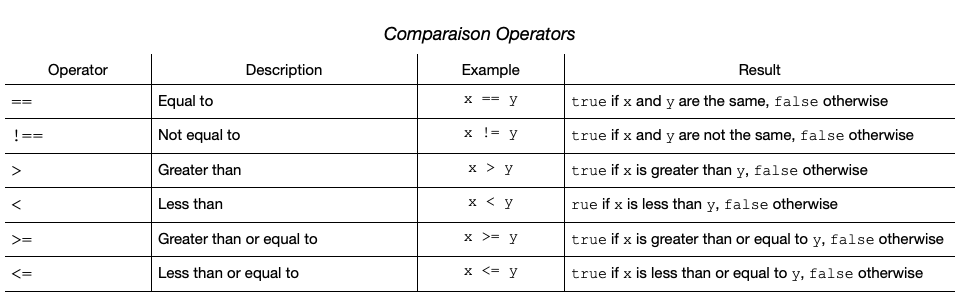
Ok, but what are "conditions" (i.e. conditionX, conditionY, conditionZ, etc.) then?